返回文章
排查过的方向:
✅ URL 格式是否正确(末尾加 /、双斜线等)
✅ 服务器是否开启伪静态、是否可以访问站点文件
✅ sitemap 文件内容是否正常
✅ 站点是否开启防爬虫安全措施
结果全部没问题。
接着检查检查 sitemap 返回内容时发现了一条报错(截图如下):
修改后重新提交 sitemap,Google 即可正常抓取
经验分享
谷歌站长工具提示“无法抓取站点地图”问题排查与解决(Typecho)
Typecho使用Sitemap插件时,因空分类/标签输出无效`<lastmod>`时间导致XML格式异常,谷歌站长工具无法抓取。解决方案是在插件Action.php文件中增加空值判断,跳过无内容的项。
2025/11/2更新于 2026/10/135 min740 阅读
最近在 谷歌站长工具(Google Search Console) 提交站点地图时遇到一个问题:提示无法抓取 sitemap。最开始以为是 URL 或 robots 配置问题,于是上网搜索了一圈,试了很多方案都没效果。 这里记录一下整个排查过程和解决方案,希望能帮到同样使用 Typecho 的朋友。
🔍 现象
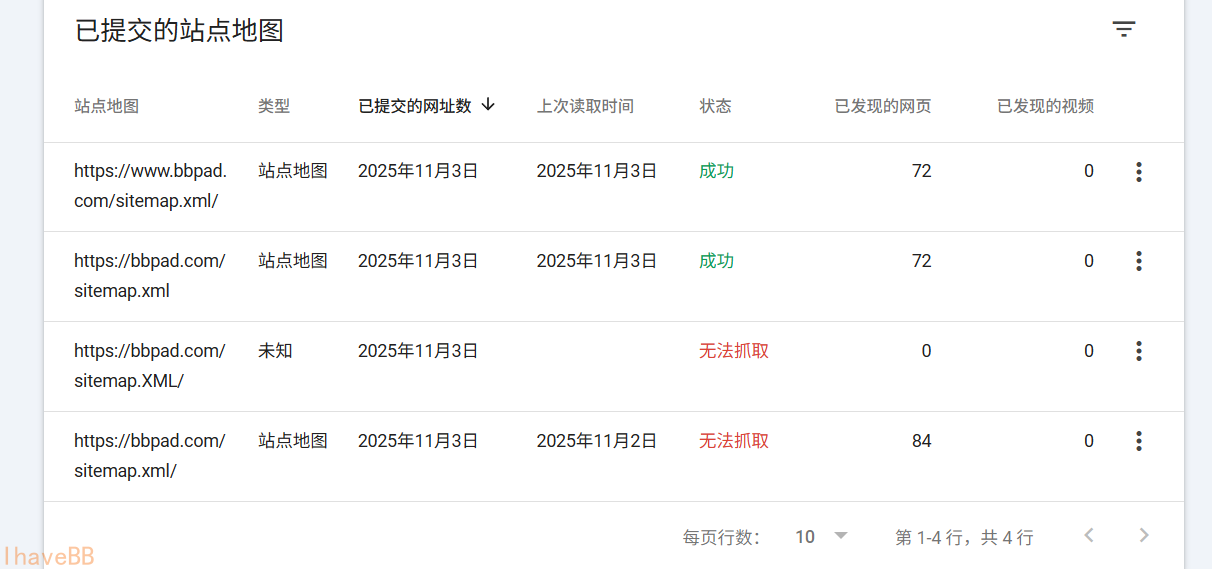
在 Google Search Console 中添加 https://bbpad.com/sitemap.xml 后提示无法抓取:
🧭 排查思路
排查过的方向:
✅ URL 格式是否正确(末尾加 /、双斜线等)
✅ 服务器是否开启伪静态、是否可以访问站点文件
✅ sitemap 文件内容是否正常
✅ 站点是否开启防爬虫安全措施
结果全部没问题。
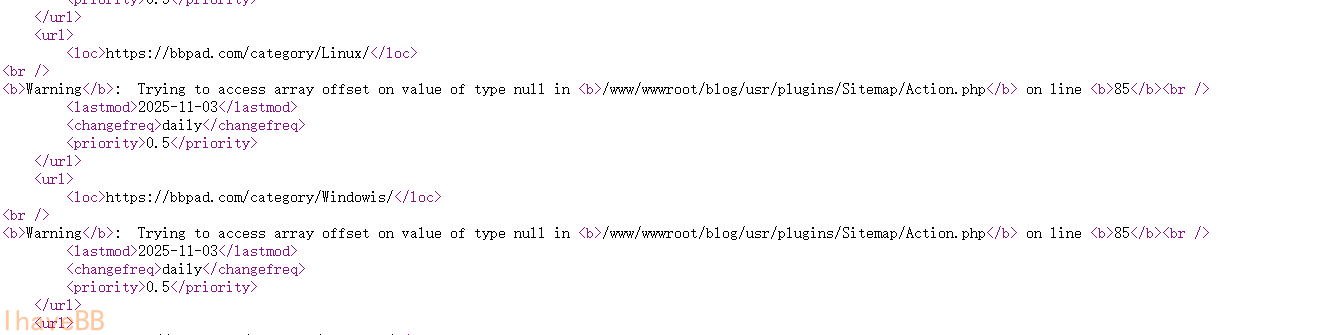
接着检查检查 sitemap 返回内容时发现了一条报错(截图如下):
🎯 定位到问题那就都好办了
Typecho 默认不自带站点地图,插件生成 sitemap,所以使用了下面的插件生成地图
Sitemap v1.0.5 - 社区维护版 https://github.com/typecho-fans/plugins/tree/master/Sitemap 根据报错定位到原因为: 某个分类或标签下没有内容,插件却读取了
modified时间,导致输出了空时间,XML 格式异常。 可能是谷歌对此解析的比较严格,必应那边就没有这个问题。
✅ 解决方案
为避免“空分类 / 空标签”输出非法 <lastmod>,需要在插件中添加空值判断,跳过这些项。
可查看PR:https://github.com/typecho-fans/plugins/pull/201/files
简单的在输出 <lastmod> 之前判断 $art_rs['modified'] 是否为空,如果为空则 continue。
打开/usr/plugins/Sitemap目录,打开Action.php文件
php.md
while($cates->next()){
$art_rs = $db->fetchRow($db->select()->from('table.contents')
->join('table.relationships', 'table.contents.cid = table.relationships.cid')
->where('table.contents.status = ?', 'publish')
->where('table.relationships.mid = ?', $cates->mid)
->order('table.relationships.cid', Typecho_Db::SORT_DESC)
->limit(1));
//这里增加内容:文章的分类跳过
if (empty($art_rs['modified'])) continue;
echo "\t<url>\n";
echo "\t\t<loc>".$cates->permalink."</loc>\n";
echo "\t\t<lastmod>".date('Y-m-d',$art_rs['modified'])."</lastmod>\n";
echo "\t\t<changefreq>daily</changefreq>\n";
echo "\t\t<priority>0.5</priority>\n";
echo "\t</url>\n";
}
foreach($tags AS $tag) {
$type = $tag['type'];
$art_rt = $db->fetchRow($db->select()->from('table.contents')
->join('table.relationships', 'table.contents.cid = table.relationships.cid')
->where('table.contents.status = ?', 'publish')
->where('table.relationships.mid = ?', $tag['mid'])
->order('table.relationships.cid', Typecho_Db::SORT_DESC)
->limit(1));
//这里增加内容: 文章的标签跳过
if (empty($art_rt['modified'])) continue;
$routeExists = (NULL != Typecho_Router::get($type));
$tag['pathinfo'] = $routeExists ? Typecho_Router::url($type, $tag) : '#';
$tag['permalink'] = Typecho_Common::url($tag['pathinfo'], $options->index);
echo "\t<url>\n";
echo "\t\t<loc>".$tag['permalink']."</loc>\n";
echo "\t\t<lastmod>".date('Y-m-d',$art_rt['modified'])."</lastmod>\n";
echo "\t\t<changefreq>daily</changefreq>\n";
echo "\t\t<priority>0.5</priority>\n";
echo "\t</url>\n";
}
修改后重新提交 sitemap,Google 即可正常抓取
😊 最后
好久没打理博客,趁这个问题顺手发了一篇文章,希望这个记录可以帮到使用typecho的同学
推荐阅读
评论 (2)
k6upuj
9qdhzz